Stop Taping Paper to Boxes. Meet Your Next Shipping Superpower.
Ink, scissors, tape—repeat. Let’s end the chaos. This friendly guide shows you which 4×6 thermal label printer to buy, how to set it up in minutes, and the shortcuts pros use to ship faster on Amazon, Shopify, and eBay.
1. The Inkjet & Laser Printer Headache (And What It’s Really Costing You)
If your current “workflow” is print → cut → tape, you’re working twice as hard for half the result. It looks scrappy, takes forever, and it’s one rainstorm away from a smudged label and a lost package.
Here’s where the waste hides:
- The Ink Tax: Ink and toner are pricey—especially to print black text. You’re paying premium prices for basic labels.
- Paper + Tape Treadmill: Full sheets for a small label, plus yards of packing tape. It adds up faster than you think.
- Time You Never Get Back: Printing, cutting, taping—repeat 20 times a day and you’ve lost hours every week.
- First Impressions: Taped paper screams “DIY.” A crisp thermal label looks pro and builds trust at the door.
- Reships & Refunds: Smudged or torn labels lead to missed scans, delays, and unhappy customers.
A thermal printer quietly fixes all of it: no ink, no taping, weather‑resistant labels, and a perfect 4×6 label in about two seconds. It pays for itself in time and sanity.
2. Your Platform-Specific Battle Plan: Win at Shipping
Different platforms, different headaches. A good thermal printer smooths them all out—fast, scannable labels that keep carriers happy and your metrics clean.
For Amazon FBA Sellers: Compliance Without the Stress
FBA is speed + accuracy. A thermal printer makes both easy:
- Scan-Perfect FNSKUs: Print crystal-clear barcodes that pass Amazon’s scanners without a second try.
- Box Labels in Seconds: Peel, stick, done—no more taping sheets that wrinkle or smudge.
- Batch Like a Pro: Print hundreds of product labels in minutes when inventory lands.
For Amazon FBM & Shopify Sellers: Daily Order Crusher
When you’re shipping every day, clicks matter. Your printer becomes the heart of the packing station.
- One-Click Printing: Works with Amazon Buy Shipping, Shopify Shipping, and tools like ShipStation. Click once—label pops out.
- Fewer Mistakes: No copy-paste errors. Addresses print exactly as the customer entered them.
- Pro Unboxing: Clean, professional labels set the tone before they even open the box.
For eBay Sellers: Protect Your Metrics
Handling times and tracking are everything on eBay.
- Faster Turnaround: Get orders out the door quickly and beat your stated handling time.
- Clean Scans, Clean Tracking: Thermal barcodes scan right the first time—fewer “Where’s my package?” messages.
- Lower Costs, Higher Margins: Save on ink and tape to reinvest in inventory.
3. Decoding the Jargon: What Actually Matters
No ink. No toner. Heat creates the image right on the label. It’s simpler, cheaper over time, and perfect for shipping labels.
The standard for USPS, UPS, and FedEx. Many printers also handle small labels (great for FNSKUs or return addresses).
Labels in under two seconds keeps you moving. Look for 5+ inches per second if you ship daily.
203 DPI is plenty for shipping. 300 DPI gives extra-crisp small barcodes and tiny logos if you want the premium look.
4. Quick Comparison: Top Printers for 2025
| Printer | Image | Best For | Print Type | Max Width | Price |
|---|---|---|---|---|---|
| Rollo Wireless Printer |
|
Ease of Use & Mac Users | Direct Thermal | 4 inches | Check on Amazon |
| Brother QL-1110NWB |
|
Versatility & Networking | Direct Thermal | 4 inches | Check on Amazon |
| Phomemo Bluetooth Thermal Label Printer |
|
Small Business & FNSKUs | Direct Thermal | 4 inches | Check on Amazon |
| Zebra ZD421d |
|
High Volume & Warehouses | Direct Thermal | 4 inches | Check on Amazon |
5. In-Depth Reviews: Our Top 4×6 Thermal Printer Picks
Rollo Wireless Thermal Printer
The Rollo is a crowd favorite for a reason. Setup is painless, it plays nicely with Mac and Windows, and it works with nearly every shipping platform. Bonus: it’s label-agnostic, so you’re not locked into one brand.
Pros
- Fast, reliable, and simple to set up
- Wi‑Fi for flexible placement
- Works with any direct thermal labels
- Compact footprint
Cons
- External label roll needs a small stand or space
Brother QL-1110NWB
A powerhouse for teams and shared packing stations. Wi‑Fi, Ethernet, and Bluetooth mean anyone on the network can print. The auto-cutter and “label crop” feature make PDFs and batches a breeze.
Pros
- Excellent connectivity options
- Automatic label cutter
- Smart PDF label cropping
- Trusted brand reliability
Cons
- Setup can be a touch more complex
- Best with Brother-brand labels
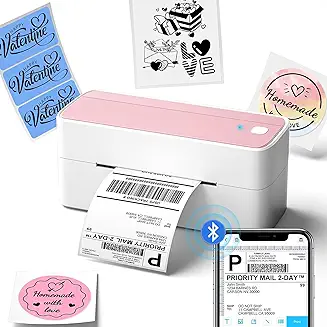
Phomemo Bluetooth Thermal Label Printer
A great all‑rounder if you print various label sizes. Automatic label recognition prevents misprints and helps track how many labels are left. The 300 DPI output is extra crisp.
Pros
- Auto label recognition
- High‑quality 300 DPI
- Solid software for custom labels
- Clean, office-friendly design
Cons
- Requires proprietary DYMO labels
Zebra ZD421d (Replaces GK420d)
When you need a printer that can run all day without breaking a sweat, Zebra is the name. The ZD421d is robust, configurable, and built for serious volume.
Pros
- Industrial-grade durability
- Extremely reliable under heavy loads
- Flexible connectivity and resolution options
- Wide enterprise support
Cons
- Higher upfront cost
- Overkill for smaller shops
6. Beyond the Basics: Pro Tips to Maximize Your Printer
Make your printer feel like cheating (in a good way):
- Use a Label Holder: If your printer feeds from an external roll, a $15 stand keeps labels neat and feeds smoothly.
- Try Fanfold Labels: They stack behind the printer, load fast, and don’t curl at the end like rolls.
- Batch Your Day’s Labels: In Shopify, eBay, or ShipStation, select all orders and print in one go. Huge time saver.
- Quick Clean = Crisp Scans: Wipe the print head with an alcohol pad every few rolls to keep barcodes razor sharp.
7. Frequently Asked Questions
Do I need ink for a thermal printer?
Can I print FNSKU labels with a 4×6 printer?
Is an expensive printer worth it for a small shop?
What labels should I buy?
8. The Verdict: Is a Thermal Printer Worth It?
Absolutely. It’s the rare upgrade that saves money, saves time, and makes your brand look better—every single day.
Trade ink, scissors, and tape for two-second, scannable labels that survive rain and rough handling. Fewer mistakes, faster packing, happier customers.
Pick a printer below, plug it in, and enjoy shipping that finally keeps up with your business.