Meet Your Next Shipping Superpower.
Ink, scissors, tape, repeat. This definitive guide shows you exactly which thermal label printer to buy, how to set it up in minutes, and the shortcuts top sellers use to scale their fulfillment in 2026.
If your current workflow involves printing on standard paper, cutting it out, and taping it to boxes, you are actively wasting time and margin. Upgrading to the best 4×6 thermal shipping label printer is the single best operations investment for any e-commerce seller. Whether you ship via USPS, UPS, FedEx, or DHL, these direct thermal machines require zero ink, print at lightning speed, and produce weather-resistant labels that guarantee safe delivery. If you are also looking to source products to ship, browse our verified Amazon FBA wholesale suppliers and US wholesale distributors directory.
1. The Hidden Cost of Your Current Printer
If you are still using a traditional inkjet or laser printer for shipping, you are paying a heavy hidden tax on every single order you process.
- The Endless Ink Tax: Cartridges are expensive. Thermal printers use heat technology, meaning you will never buy ink or toner again.
- The Tape Treadmill: Securing a standard piece of paper requires yards of packing tape per box. 4×6 thermal labels peel and stick instantly.
- Time You Never Get Back: Processing 20 orders manually can take an hour. A thermal label printer for small business cuts that down to under 5 minutes.
2. Your Platform-Specific Workflow
Amazon FBA Sellers
Print scan-perfect FNSKU and box labels that pass Amazon’s strict inbound warehouse scanners on the first try. Batch print hundreds of ASINs in minutes directly from Seller Central.
Shopify and FBM Sellers
Integrate seamlessly with Shopify Shipping, ShipStation, or Amazon Buy Shipping. Achieve true one-click printing directly from your dashboard with zero formatting errors.
eBay and Etsy Sellers
Get daily orders out the door rapidly to protect your seller metrics and top-rated status. Fast tracking uploads and professional packaging build immediate customer trust.
3. Quick Comparison: Top Printers for 2026
| Printer Model | Image | Best Use Case | Buy |
|---|---|---|---|
| Rollo Wireless |  |
Best Overall, Mac and PC, Wi-Fi | Check Amazon |
| Brother QL-1110NWB |  |
Office Networking, Smart PDF Crop | Check Amazon |
| Phomemo Bluetooth | 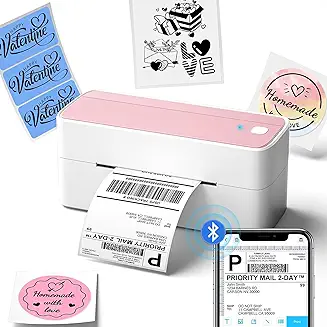 |
Best Budget, Mobile Phone Setup | Check Amazon |
| Zebra ZD421d |  |
High Volume, Commercial Logistics | Check Amazon |
4. In-Depth Reviews: Our Top Picks
Rollo Wireless Thermal Printer
The Rollo is a massive crowd favourite for a simple reason: it just works. Setup is virtually painless, it plays well with both Mac and Windows, and its wireless capabilities mean you can print directly from your smartphone or iPad. The unlimited label compatibility means you are never locked into expensive proprietary rolls. Perfect for Amazon FBA sellers managing high SKU counts across multiple warehouses.
Pros
- Lightning-fast 150mm/s print speed
- AirPrint and Wi-Fi enabled
- Works with any direct thermal label
Cons
- Requires external label roll holder
- Premium price point
Brother QL-1110NWB
A true powerhouse for multi-person teams and offices. Equipped with Wi-Fi, Ethernet, and Bluetooth, multiple employees can print to this single hub simultaneously. Its standout feature is the Smart PDF Crop, which automatically extracts and scales barcodes from standard letter-size PDF sheets. Ideal for Chicago and New York wholesale distributors running shared fulfilment offices.
Pros
- Ethernet, Wi-Fi, and Bluetooth
- Built-in automatic label cutter
- Smart PDF barcode cropping
Cons
- Optimized for proprietary Brother labels
Phomemo Bluetooth Thermal Printer
If you are a startup prioritising cost-efficiency, the Phomemo is your best option. It delivers an ultra-crisp 300 DPI resolution, higher than many premium models, ensuring even the smallest FNSKU barcodes scan perfectly. The automatic label recognition stops misprints before they happen. A great pairing for small wholesale distributors just getting started with e-commerce fulfilment.
Pros
- High-resolution 300 DPI output
- Smart auto label recognition
- Excellent user-friendly mobile app
Cons
- Bluetooth only, no Ethernet
Zebra ZD421d
When you need a commercial-grade machine that prints continuously without overheating or skipping, Zebra remains the undisputed industry standard. It is rugged, highly configurable, and engineered to survive the rigorous demands of a professional shipping warehouse running at full capacity every day. Used by major California and Texas logistics operations processing thousands of orders daily.
Pros
- Unmatched industrial-grade durability
- Decades of proven reliability
- Massive enterprise software support
Cons
- Highest upfront investment
- Steeper learning curve for setup
5. Frequently Asked Questions
Do I need to buy ink for a thermal printer?
Can I print Amazon FNSKU labels with a standard 4×6 printer?
Is an expensive industrial printer worth it for a small business?
The Final Verdict
Upgrading your logistics is the rare business investment that immediately saves money, saves time, and elevates the professionalism of your packaging every single day. Pick your preferred printer above, plug it in, and watch your daily fulfillment speed double.
Review Top Picks Again